

Following on from our one-month deep dive with the MacBook Neo, we shared our general delight with the platform. It’s a cracking machine that handles the daily grind with ease. But we wanted to push things further.
We set ourselves a challenge: Can we turn the MacBook Neo into a full-blown professional workstation for around £1,000?
We put ourselves in the shoes of a new user who loves the portability of the Neo but needs a “home base.” The goal was a clean, single-cable setup. You walk in, plug one USB-C lead into your Mac, and instantly your keyboard, mouse, and a massive 32-inch 4K display spring to life.
Here is how we built the ultimate budget-conscious powerhouse.
The Goal: Single-Cable Simplicity
The dream is simple: no faffing with five different wires every time you sit down. We wanted a solution that allows for “Clamshell Mode” (using the laptop closed while it powers the big screen) or an Extended Display setup for double the screen real estate.
To achieve this without breaking the bank, we bypassed expensive branded docking stations and looked at a high-quality modular approach.
1. The Brains: UGreen Connectivity
To get that single-cable magic, we used a trio of UGreen components:
- UGreen 7-in-1 Hub: This acts as the central station for the monitor and peripherals.
- UGreen 65W GaN Charger & 3m USB-C Cable: By connecting these directly to the hub, we ensure the Neo stays charged while sending a crystal-clear 4K signal to the screen. It’s the “one wire to rule them all” approach.
2. The View: 32 Inches of 4K Glory
A workstation is only as good as its screen. We chose the Samsung ViewFinity S7 (32″). At £219, it’s a steal for a 4K Ultra HD panel. The sheer size means you can have your email, a web browser, and a spreadsheet open all at once without squinting.
3. The Interaction: Logitech Signature Slim MK950
To round off the professional feel, we opted for the Logitech Signature Slim MK950 wireless combo. We’re big fans of this set because it bridges the gap between work and home. It’s quiet, slim, and—crucially—allows you to switch between your MacBook and even your phone or tablet with a single tap. It adds a level of polish to the desk that cheap plastic keyboards just can’t match.
The “Grand Total” Breakdown
Even with a premium keyboard and mouse combo, we managed to come in well under our £1,000 target.
| Item | Description | Cost |
|---|---|---|
| MacBook Neo | The Core Machine | £599.00 |
| Samsung ViewFinity S7 | 32″ 4K Ultra HD Monitor | £219.00 |
| Logitech Signature Slim MK950 | Wireless Keyboard & Mouse Set | £79.99 |
| UGreen USB-C Hub | 7-in-1 Connectivity | £34.99 |
| UGreen 65W Charger | Power Adapter | £22.99 |
| UGreen USB-C Cable | 3m 100W Lead | £7.49 |
| TOTAL | £963.46 |
The result
You be the judge, a wire free desk with a bold bright screen. We even managed to source a simple VESA adapter and wall mount the screen. Clean unobstructed performance. We paired this onto a Dunelm Georgi wide desk (£249) which we already had and discreetly routed all the cabling for that “floating in space look”. The MacBook is plugged in via a single USB-C cable to the hub, which powers the MacBook Neo, provides connectivity to the monitor, and to the KB/Mouse via a USB dongle plugged in directly.
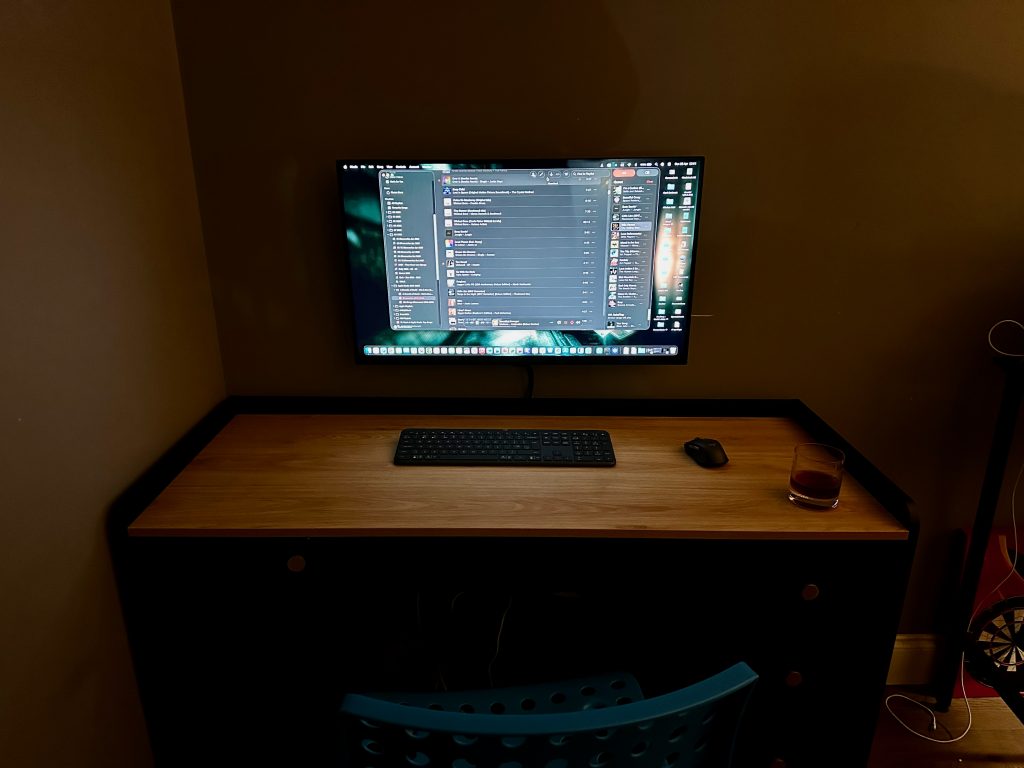
When you want to work, simply open the drawer , plug in teh singular cable to the USB-C dock, the monitor pops into life, the perheprials are connected. Close the MacBook, pop it in drawer and work away. It’s almost like magic.
Verdict: Why This Matters
For under £965, you have a setup that handles office work, creative projects, and home admin with zero friction. It’s tidy, it’s powerful, and most importantly, it’s flexible.
Setting these things up to “just work” can sometimes be a bit fiddly—getting the right resolution, ensuring the power delivery doesn’t drop, and managing Clamshell settings. If you want a workstation like this but want it professionally configured, Gorilla Networking is here to help.
We can source, supply, and set up this exact solution in your home or office. Ready to upgrade your desk? Contact us today and let’s get you sorted.